🚨 The Problem
If you’ve tried to add HTML—like <h2>, <a>, or even <strong>—to category or tag descriptions in WordPress or WooCommerce, you’ve likely encountered a frustrating issue:
✂️ Your HTML gets stripped out as soon as you click “Update.”
Even when you’re logged in as an Administrator with full permissions, WordPress aggressively sanitizes taxonomy descriptions. And if you’re using WooCommerce or advanced builders like Oxygen, things get even more locked down.
🔎 Why It Happens
By default, WordPress sanitizes category and tag descriptions using:
wp_kses()andwp_filter_ksessanitize_term_field()during save- WooCommerce’s internal
sanitize_callback - Third-party plugins or theme builders (like Oxygen) that re-hook save operations
In many cases, even filters like remove_filter('term_description', 'wp_kses_data') won’t help — especially when plugin priorities override your changes.
🛠️ The Real Fix: Forcing Raw HTML via MU Plugin
After testing filters, taxonomy re-registrations, and plugin overrides, the only bulletproof solution was to hook into the edited_term action and forcibly update the description using wpdb.
https://github.com/popn-fresh-with-the-tech/raw_html_category_tags/blob/main/README.md
Here’s the plugin that worked:
✅ mu-plugins/force-term-html.php
<?php
/**
 * Plugin Name: Force Raw HTML in Term Descriptions
 * Description: Forces term descriptions to allow raw HTML even when other plugins strip it.
 */

add_action('init', function () {
    // Only proceed in admin context
    if (!is_admin()) return;

    // Hook directly to edit process
    add_action('edited_term', function ($term_id, $tt_id, $taxonomy) {
        if (!current_user_can('unfiltered_html')) return;

        if (!empty($_POST['description'])) {
            global $wpdb;

            // Forcefully update raw HTML in the database
            $description = wp_unslash($_POST['description']);
            $wpdb->update(
                $wpdb->term_taxonomy,
                ['description' => $description],
                ['term_taxonomy_id' => $tt_id]
            );
        }
    }, 999, 3); // Must be high priority and receive all 3 args
});
🧰 Installation Instructions
- Go to your WordPress root directory.
- Navigate to:
/wp-content/mu-plugins/ - If
mu-pluginsdoesn’t exist, create it. - Create a new file:
force-term-html.php - Paste the code above.
- Save and refresh your WordPress admin.
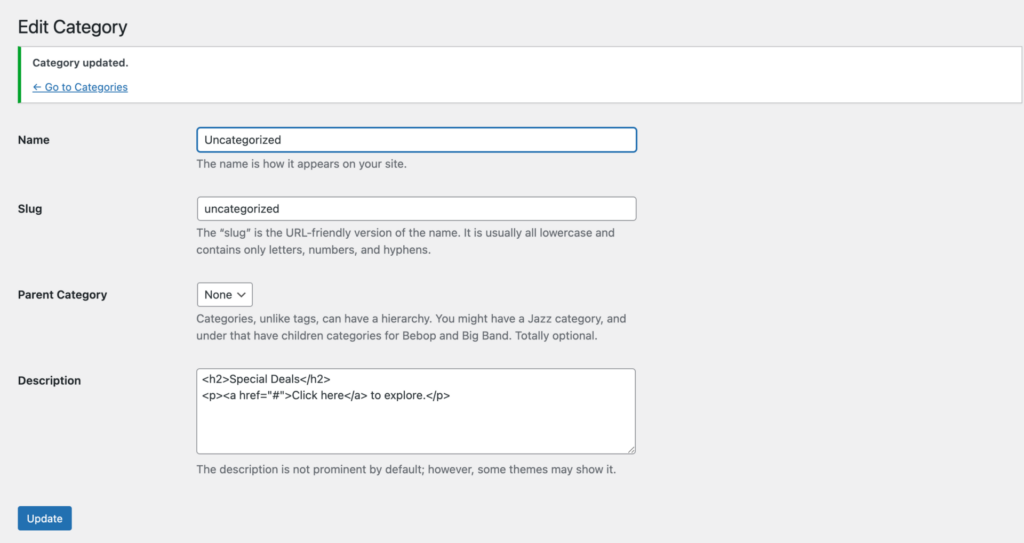
- Edit any category or tag → insert HTML like:
<h2>Special Deals</h2><p><a href="#">Click here</a> to explore.</p> - Save — the HTML should now be preserved. ✅
🔐 Security Note
This plugin only applies the override if the current user has unfiltered_html capability — typically Administrators. That means regular users can’t insert unsafe HTML unless they’re granted that capability.
✅ Confirmed Working With:
- WordPress 6.5+
- WooCommerce 8.x+
- Twenty Twenty-Five Theme
- Oxygen Builder (v4.x+)
- Custom role management plugins
🔄 Why This Works (Even When Other Solutions Fail)
Rather than relying on fragile filters like pre_term_description, this plugin:
- Intercepts the term update process
- Runs last, after all other filters
- Overrides the saved description using direct DB access (
$wpdb) - Avoids breaking admin UI or relying on unregistering/re-registering taxonomies
💡 Final Thoughts
Whether you’re building a custom storefront, enhancing your blog SEO, or using Oxygen to craft category archive pages, having raw HTML in your taxonomy descriptions can elevate your site’s content.
This fix ensures that no plugin can silently override your content.
