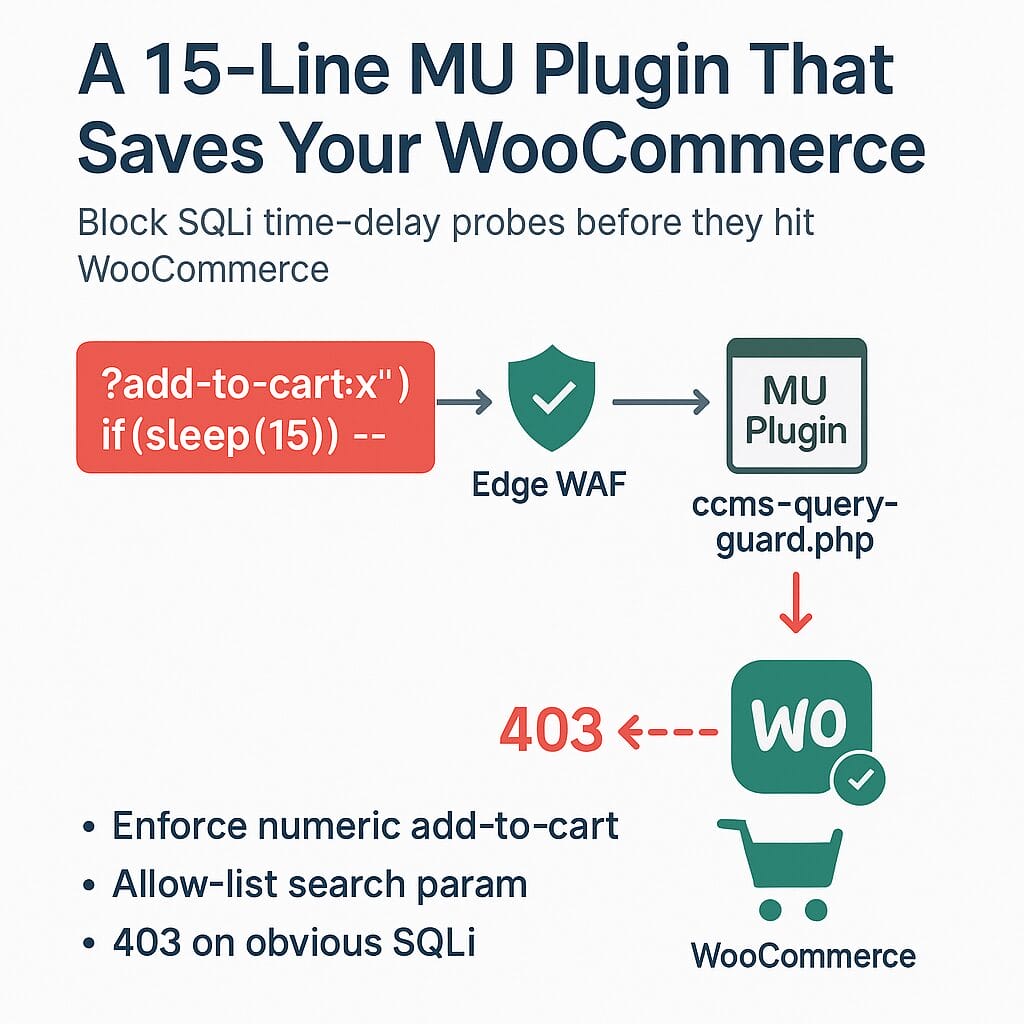
If your WooCommerce cart sometimes freezes, checkout spins forever, or your hosting shows CPU spikes—especially when your logs contain weird stuff like sleep(15) or waitfor delay—you may be getting hit by a time-delay SQL injection probe. A 15-line “must-use” plugin (MU plugin) can block the most common junk before WordPress does any heavy lifting. It works alongside Wordfence and other security tools.
Why this post?
I recently helped a store that looked “down,” but the cause wasn’t a server outage. Bots were hammering the site with junk like:
/?add-to-cart=x") if(sleep(15),null,null)--
/?s=1691702283&post_type=product&type_aws=x") waitfor delay '00:00:15' --
Even with a security plugin, these payloads can slip far enough into WordPress to eat resources. The fix we used was tiny, safe, and reversible—and it can help non-developers.
What’s a “time-delay SQL injection” probe?
Attackers send requests designed to force the server to pause (e.g., sleep(15), waitfor delay). Even if your database isn’t actually exploited, attempting to parse this junk can still waste CPU and make the site feel slow.
Do you need this?
Use this quick checklist:
Symptoms
- Add-to-cart or checkout intermittently stalls or times out
- Hosting shows CPU/memory spikes with no traffic surge
- Wordfence (or your host’s logs) show URLs containing
sleep(,waitfor delay,union select, etc.
Where to look
- Wordfence → Tools → Live Traffic (or your host’s access logs)
- Your access log may show patterns like:
GET /?add-to-cart=x") if(sleep(15)) --GET /?type_aws=... waitfor delay ...
If any of the above looks familiar, the MU plugin below can help as a last-line, app-level gate.
What this tiny fix does (in plain English)
- Blocks non-numeric “add-to-cart” requests. WooCommerce expects a product ID like
?add-to-cart=123. The guard 403s anything else (before Woo has to work). - Tidies a common search parameter used by some product search plugins (e.g., Advanced Woo Search): it allow-lists known values and ignores anything odd.
- Rejects obvious time-delay injection keywords (
sleep(,waitfor delay, etc.) early, to protect performance.
It does not replace Wordfence or a WAF. Think of it as a seatbelt—small, fast, and tuned to your store’s routes.
Step-by-step: Add the “Query Guard” (no developer needed)
What you’ll do
Create one file via your host’s File Manager (or SFTP). You’re not editing core, and you can remove it anytime.
- Go to your site files:
wp-content/ - If it doesn’t exist, create a folder named
mu-plugins(exactly that). - Inside
mu-plugins, create a file namedccms-query-guard.php - Paste this code and save:
Create one file via your host’s File Manager (or SFTP). You’re not editing core, and you can remove it anytime.
<?php
/**
 * Plugin Name: CCMS – Query Guard (add-to-cart & aws)
 * Description: Blocks non-numeric add-to-cart and sanitizes Advanced Woo Search param. Returns 403 on obvious injection payloads.
 * Version: 1.0.0
 */

add_action('init', function () {
    // 1) Enforce numeric add-to-cart (GET or POST)
    foreach (['GET','POST'] as $m) {
        $src = ($m === 'POST') ? $_POST : $_GET;
        if (isset($src['add-to-cart']) && !preg_match('/^\d+$/', (string)$src['add-to-cart'])) {
            status_header(403);
            exit; // stop early
        }
    }

    // 2) Harden Advanced Woo Search "type_aws" (adjust if your search plugin expects different values)
    if (isset($_GET['type_aws'])) {
        $val = strtolower((string) $_GET['type_aws']);
        $allowed = ['product', 'products']; // customize to your setup if needed
        if (!in_array($val, $allowed, true)) {
            unset($_GET['type_aws']);
        }
    }

    // 3) Quick deny for obvious time-delay SQLi in the query string
    $qs = isset($_SERVER['QUERY_STRING']) ? strtolower((string)$_SERVER['QUERY_STRING']) : '';
    if ($qs && preg_match('/(sleep\(|waitfor\+?delay|benchmark\(|union\+?select|information_schema|sysobjects|\bxor\b)/', $qs)) {
        status_header(403);
        exit;
    }
});
How to test (safe)
- Try adding a normal product to the cart → works as usual.
- Visit a nonsense URL like:
https://yourstore.com/?add-to-cart=xyz→ you should get a 403. - If you use a product search plugin with
type_aws, do a normal search → still works.
To remove: Just delete the file. That’s it.
“Don’t Wordfence/Woo already do this?”
- WooCommerce can’t assume every store uses only numeric add-to-cart routes (some custom flows pass SKUs or other data). So it doesn’t 403 these requests by default.
- Wordfence and WAFs are great. Keep them. But rule sets vary, and some junk gets far enough into WordPress to hurt performance before being blocked. This MU plugin acts inside WordPress, at the very beginning of the request, and knows about your store’s specific parameters.
Bottom line: This is defense in depth.
Edge WAF/CDN → NGINX/Apache rules → MU plugin guard → WooCommerce. Each layer reduces risk and server load.
Optional: Ask your host to add these server rules (copy/paste)
If you have managed hosting, you can send this to support:
Block non-numeric add-to-cart and common SQLi patterns (NGINX example):
# Flag bad "add-to-cart" if not strictly digits
map $arg_add_to_cart $bad_addtocart {
    default 0;
    "~^[0-9]+$" 0;
    "~." 1;
}

# Flag obvious SQLi/time-delay tokens
map $query_string $bad_sqli {
    default 0;
    ~*(sleep\(|waitfor\+?delay|benchmark\(|union(\+|%20)select|information_schema|sysobjects|\bxor\b|%27|%22) 1;
}

server {
    if ($bad_addtocart) { return 403; }
    if ($bad_sqli)      { return 403; }
}
Cloudflare WAF idea (GUI):
Create custom rules to Block when Query String contains sleep( or waitfor delay, and a second rule to Block when Query String contains add-to-cart and does not match the regex ^\d+$.
Will this break anything?
- Standard WooCommerce: No. Normal add-to-cart uses numeric product IDs.
- Custom flows: If you have a plugin that intentionally uses non-numeric
add-to-cart, tweak the numeric check to allow your pattern. - Search plugins: If you don’t use the
type_awsparameter, that section is harmless—or delete it.
Keep your other security tools
This MU plugin is just one layer:
- Keep Wordfence (or your preferred security plugin).
- Keep your CDN/WAF rules.
- Keep WordPress, WooCommerce, and plugins up to date.
Quick checklist
- Do you see
sleep(/waitfor delay/union selectin logs? - Do carts hang during these bursts?
- Do you have spikes with no traffic increase?
- You want a fix you can add or remove in minutes?
If yes, the MU “seatbelt” is worth it.